Showing posts with label TORRENT-TRICKS. Show all posts

How to Create and Upload a Torrent File

Torrents are the best way to share large files with your friends or with a large group of people and sometimes even with the people you don't know.
  • Whenever some of my friends want to send me a large file they find it very difficult.They upload files on some Cloud service providers like Google Drive,Dropbox ,Skydrive etc ,which are again allow limited size for free users.Although they upload files to these cloud service providers its again a hectic process to download these large files as the net can get disconnected anytime and you have to start over download the file again.So , the best way I found is share files via torrent.
  • Most of the people know how to download torrent files but are not aware of how to upload a file on torrent and share it with your friends and public.In this tutorial we will be looking into a step by step guide on how to upload a file on torrent.
    Uploading a file on torrent is not same as we upload file on some networks like Google Drive or Dropbox. Torrent Technology is a little different from others so here we have to follow some different yet easy steps to upload a file on torrent.
    Read more »

    Bittorrent Technology Reviewed-How Torrents Work?

    World Wide Web is full of so-called „Torrents“, internet users often speak about “torrent files” and use different portals to find them. Let’s go a little bit deeper into the past and understand what is really meant under this term.
    Bittorrent working model

    What is Torrent file and how it works?

    Torrent is an unofficial term used for BitTorrent. Bittorrent is a peer-to-peer protocol that works without the need for a central server. This means that not a server is responsible for sending you information, but you connect directly other available network members to get data transferred. In other words, BitTorrent’s “swarm” consists of many personal computers connected to each other directly through BT protocol.
    Read more »

    How To Download Torrent Files with IDM-New Trick

    I already posted a Trick on "How To Download Torrent Files With IDM" but unfortunately Torrific.com which is the key website in this trick is down now and unreachable.
    So I am re posting this trick on because I found a new website similar to Torrific.com that helps you in downloading torrent files with IDM.
    We all use Torrent to download various kinds of files like songs,movies,books,software's and much more.The download speed of torrent depends on many factors like seeders,leeches,peers, Internet connection and much more.Sometimes you may face difficulty in downloading torrent files with less seeds which results in slow download.So here I got a trick to Download Torrent Files With IDM keep reading.

    Advantages of downloading torrent files with IDM:

    1.Internet Download Manager(IDM) is the best download manager and speeds up your overall download speed by 5 times.
    2.Internet download manager speed doesn't depend on seeders,leeches etc,it only depends on your Internet connection. So, you can download torrent files with IDM without any difficulty if you have good net connection.
    4.If Torrent is blocked in your offices,schools,colleges etc then you can download torrent files with Internet download Manager(IDM) easily.
    5.Downloading Torrent Files With IDM is really useful when you are downloading files with less seeds.

    What is the alternate website or website like Torrific.com?

    • The website similar to Torrific.com is zbigz.com.Keep Reading on how to download torrent files with zbigz.com.

    Steps To Download Torrent Files With IDM:

    1.First go to Zbigz.com[Click Here].
    2.Signup for a free account there.Get Premium account from here.
    3.After the signup process is finished go to your torrent search engine and search for the file which you want to download with idm.
    4.Then download the torrent file from your desired torrent.
    5.Now go to Zbigz.com[Click Here].
    6.There hit on upload and choose the torrent file which you have downloaded previously then hit Go.
    7.Then a window will pop up asking for premium or free download.Choose Free Download.

    8.After choosing free your torrent file will be downloaded by high speed servers and your file will be ready to download(If its a large file then wait for few minutes).
    9.When you hit download button then a box will pop up asking the type of download which you want either free or premium.Go for free download.
    10.That's it your download will be ready and you can download torrent files with idm.
    Update 1:If you feel that your file is not caching properly by zbigz,then first get cached link using torcache.net then paste that link in zbigz  and hit go.
    Update 2:If you are having trouble in download files with zbigz.com then you can try alternate services like zbigz.com.

    Also read:

    Video Tutorial on How To Download torrent files with IDM:

    So now you can comfortably download torrent files with IDM without any difficulty.If you have any problem then please leave a comment I will definitely help you.Those who have already downloaded torrent files with IDM share your experience.

    Alternate website or website like torrific.com [zbigz.com]

    The website Torrific.com is down since many days.So many of them asked me a good alternate website or website like Torrific.com.I searched many websites and finally collected some websites like Torrific.com which helps you in downloading torrent files with IDM or the Default download manager.

    Alternate website or website like Torrific.com:

      1.Put.IO[Highly Recommended]:

      This is a very new service which I recently found.It offers you to download files upto 1GB for free.Its faster than zbigz.com and you can download files within few minutes.

      2.Zbigz.com[Highly Recommended]:

      This is the best website as of now to download torrent files with IDM(Internet Download Manager).I mostly use this service to download torrent files with IDM.

      Some other good Alternatives for Zbigz.com:

      1.Bitlet.org [Recommended]
      2.Furk.net
      3.Quick Torrent[ http://www.quick-torrent.com/ ]
      4.TorrentHandler.com
      Well these are some good websites I have found and given a try to download torrent files with Internet Download Manager(IDM) or any other download manager.If you have any other then share with us in your comments.

      Also Read:

      How To Download Torrent Files Without Torrent Client

      Now you can download torrent files without Torrent Client like utorrent/Bittorrent/Bitcomet etc.Using this method you can download torrent files with any download manager like IDM,DAP etc.Or you can download it as a normal file.
      Torrent Clients

      Steps to Download Torrent Files Without Torrent Client:

      1.To download torrent files without torrent client go to zbigz.com.
      2.Signup for a free account there.
      3.The download the exe torrent file and upload it there.
      4.After you upload the file and hit go your torrent file will be download by zbigz.com high speed servers and will be available for you to download normally without any torrent client.

      Also Read The Below Articles:

      How to Increase uTorrent Download Speed

      Increasing torrent speed is effort taken by almost every Internet user who uses torrents for downloading files. Maximum downloads are  done through torrent clients. So can you Increase downloading speed of Torrent?  If yes than how to increase downloading speed of your torrent? keep reading........
      According to Wiki the torrent protocol accounted for 43% to 70% of all Internet traffic  as of February 2009.


      What are Torrent Peers and Seeds??

      Torrent is a word derived from word Bit Torrent which is a peer-to-peer files sharing protocol which is also used as file extension. It’s distributing files over the Internet. This protocol is designed by Programmer Bram Cohen in April 2001 and released the July 2 2001.
      Peer-A peer is refer to a particular node (A computer like you) which is currently sharing (either uploading or downloading) the data using torrent client. It’s specific for each torrent. 
      Seed-Seeds are referring to those peers which have 100% of file. So if you have zero (0) seeds than its waste of time to download that torrent.

      How To Increase Torrent Download Speed?

      Here are some tips which help you to increase your torrent speed. Some of them are tradition tricks and some are new but these are tricks which surely help you to increase your torrent speed.

      1. Choosing Best torrent Client .i.e. Bit Torrent:

      Choosing the best torrent client is the first point you should care about if you are thinking to get maximum torrent downloading speed. As per requirement increases there are many torrent clients available in market. So chose only trusted and best bit torrent client from the official site of bit torrent.

      2. Always chose torrent with good trackers, seeds and peers:

      Second point is choosing the right torrent. If you are using a week torrent with less tracker, seeds and peers than it’s hard to get a good downloading speed. Never download a torrent which has zero (0) seeds. Always download a torrent which have at least one seeds (its minimum) and with maximum peers. Next are trackers, which are also important. Check the properties of your torrent you can find list of trackers.
      If you are unable to find the torrent with good seeds and peers than you can increase your seeds and peers of your week torrent by re announcing it refer my post on how to re announce a torrent file/How to Increase seeds and peers of torrent.
      If your torrent has less or week trackers, than you can increase your trackers also. 

      3. Change the settings of your torrent client:

      You can change some setting in your torrent client software (no matter what client it is) which will help you to increase the torrent downloading speed. Changing few simple setting like bandwidth, port is helpful in increase the torrent downloading speed. To know about these setting in detail please refer the post Best Settings to Increase torrent speed.

      4. Download torrent with help of Downloading managers (IDM, DAP, Orbit etc)

      Torrent client use the torrent protocol which is peer-to-peer files sharing protocol to download file. Even the P2P protocol is best among all for downloading file but some time downloading file using other protocol can help in gaining more downloading speed. You can use your downloading managers to download your torrent files. 

      5. Increase the number of Max Half Open TCP connections:

      The Max Half Open TCP connections specify that how many connections a torrent client should attempt to establish simultaneously at any given time. Operating Systems like Windows XP-SP2and newer, limits this to a default of 10.As torrents need a large number of simultaneous connections you can increase your torrent downloading speed by changing this figure.
      A patch has been available for a while from LvlLord which modifies the TCPIP.sys file in Windows to allow a higher number of TCP connections.
      After running the patch, you have to change your torrent client settings also. In uTorrent  go to 
      Options ->Preferences ->Advanced – >net.max_halfopen.
      Set any number from 50 to 100.Dont use more than that. Also keep checking TCPIP.sys for cross verifying the number of Max Half Open TCP connections.

      How much we can Increase torrent Speed Actually??

      Yeah it’s very important to understand that up to how much speed you can increase for downloading torrent. Many of you are may be getting a good downloading speed from torrent (which is equal to your bandwidth limit) still landed to this page because you want more speed. Than sorry you can’t get more downloading speed for torrent than your bandwidth.
      If you have facing problem with your slow bandwidth speed than please read my article How to Increase your bandwidth/Internet connection speed.
      So this way you can Increase the downloading speed of your torrent file.
      Himanshu Kumar Das is an Engineering Student.He Blogs at Geek House.

      Tweak Utorrent Setting To Increase Torrent Download Speed

      Utorrent is the best light weight Torrent Software to download various files from Torrent.In this tutorial we will tweak the default utorrent settings and make the download faster.If you have  a good IDM(Internet Download Manager speed) then you can download torrent files with idm.
      Note:Please note that your torrent download speed doesnt exceed your bandwidth.These settings will help you when you are download torrent files with less seeds and peers.

      Steps to Tweak Utorrent Settings:

      OPEN YOUR TORRENT AND FOLLOW THE SETTINGS:

      1.Open your utorrent :


         2.Go to Options->Preference


      3.Go to connection and do the following settings


      4.Go to Bandwidth and follow the settings


      5.Then go to Bittorrent and follow the settings


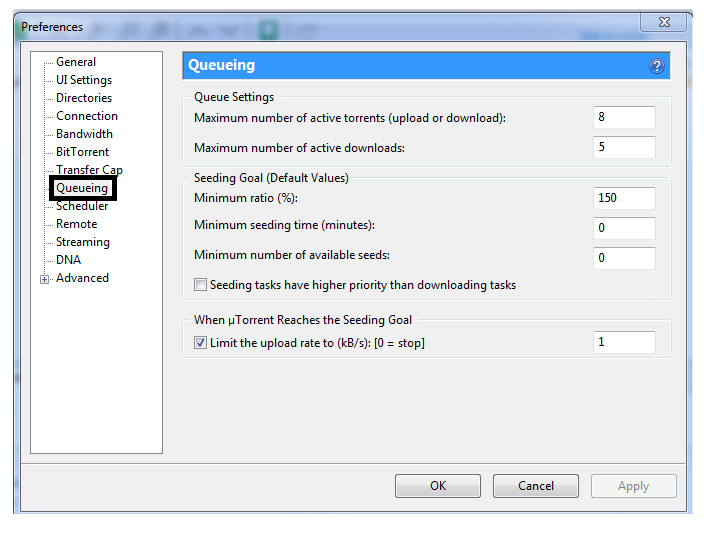
      6.Then go to Queueing and do the following settings


      7.Then click on Advanced and follow the settings


      8.Now set your bandwidth high when you are downloading any file


      Please Note:Go to speedtest.net and take a test of your Internet Speed.If your net speed is 1Mbps then follow these calculations.
      • 1Mbps = 1024Kbps.Similarly 2Mbps = 2*1024=2048Kbps.
      • But all our downloads will be in KBPS.
      • Here you must understand the basic difference between Kbps and KBPS.Kbps-Kilo Bits Per Second.KBPS-Kilo Bytes Per Second.
      • 8 Bits = 1Byte.
      • So ,if your torrent download speed is 1Mbps(According to speedtest.net)  which is equal to 1024 Kbps.You should divide this by 8 to convert it into KBPS(Kilo Bytes).
      • So 1024/8 =128.
      • Which means if your net speed is 1Mbps then your download speed should be in between 120-130KBPS not more than that. 
      •  So,if you are getting that speed then you must be happy.Your download speed cannot exceed your bandwith.Cheers :) 
      Hope these setting helped you in increasing torrent download speed.If you have any trouble please feel free to comment.

      Ads 468x60px

      Social Icons

      Featured Posts